
Ayafy feature · Free
Quran Reminders That Fit Your Day
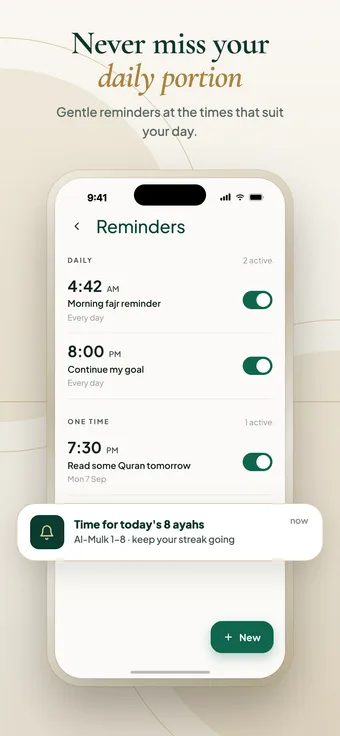
Ayafy’s reminders help you keep a daily Quran routine. Create reminders for the times that suit you, such as after Fajr or before bed; each one repeats daily or fires once on a chosen date, and can be edited, switched off or deleted at any time.
Step by step
How it works
-
Open Reminders (Manage on the home screen).
-
Choose a time and whether it repeats daily or fires once.
-
Give it a label, like “Morning Fajr reminder”.
-
Switch it off, edit it or delete it whenever you like.
Inside the feature
What you get
- Daily repeating reminders
- One-time reminders for a specific date
- Your own label for each reminder
- Several reminders active at once
- Toggle, edit or delete anytime
Can I set more than one reminder?
Yes. You can keep several reminders active at once, such as one after Fajr and one in the evening.
What is the difference between daily and one-time reminders?
A daily reminder repeats every day at the same time. A one-time reminder fires once on the date and time you choose.
Why am I not receiving reminders?
Check that notifications for Ayafy are allowed in your phone’s settings and that the reminder is switched on in Ayafy.
Keep exploring
More Ayafy features
Free on iOS and Android
Try Reminders in Ayafy
Every Ayafy feature is free. Download the app and start today.