
How to Use Ayafy for Hifz: A Step-by-Step Guide
Set a hifz goal, recite from memory while Ayafy checks every word, run revision tests and track what is due. Your first week with Ayafy, step by step.
Using Ayafy for hifz comes down to a short daily loop. You set a goal so you know what to learn today. You recite it from memory while Ayafy listens and marks each word. Then you revise older portions with the tests Ayafy builds for you. This guide walks through each step, in the order you would do them in your first week.
You will need the app from the App Store or Google Play and a Google or Apple account to sign in. Ayafy assumes you can already read the Arabic text of the Quran.
Step 1: Tell Ayafy what you already know
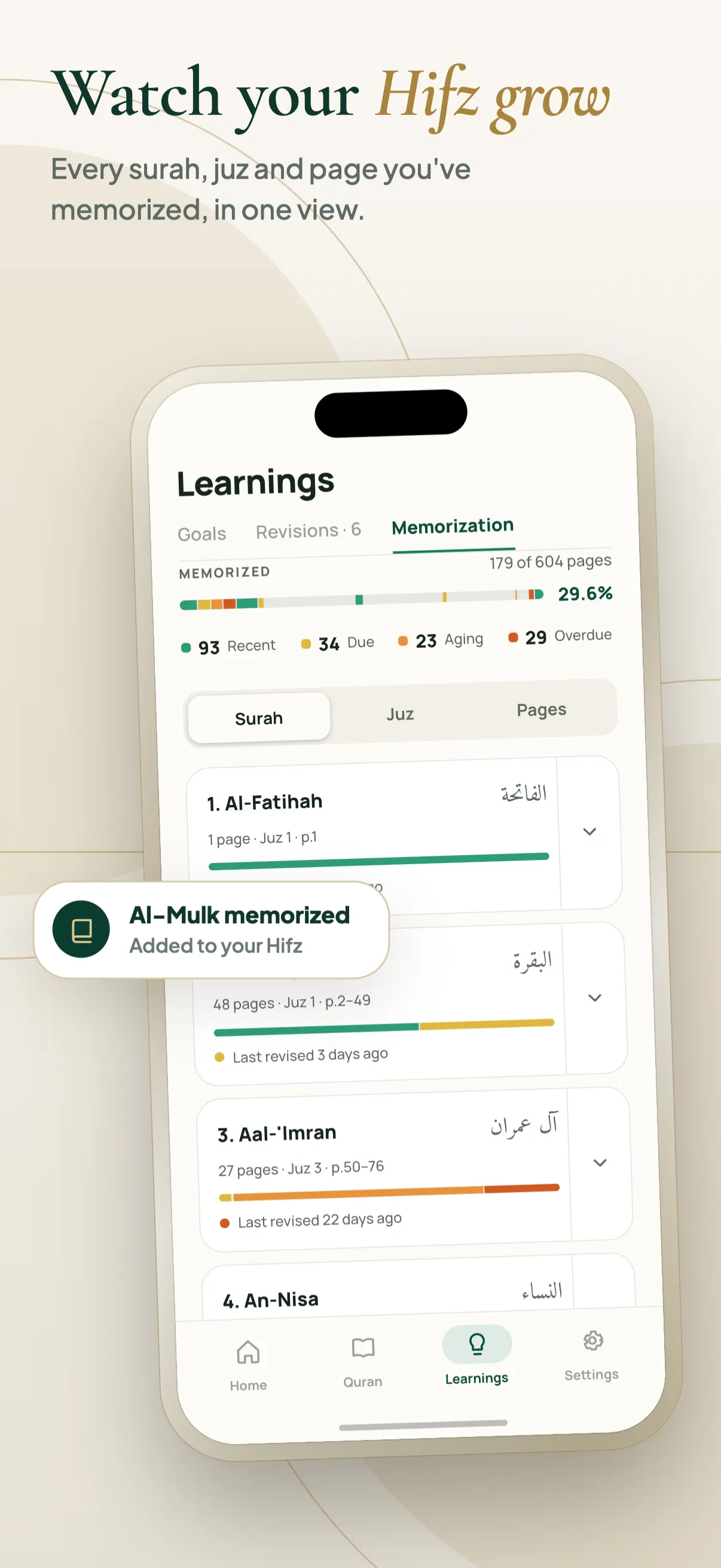
If you have memorized anything already, even just Al-Fatiha and a few short surahs, add it first. Open Learnings, go to the memorization view and mark those surahs as learned. It takes a minute.
This matters because those surahs then go into your revision straight away. Otherwise Ayafy only knows about what you learn from today onwards.
Step 2: Set a goal
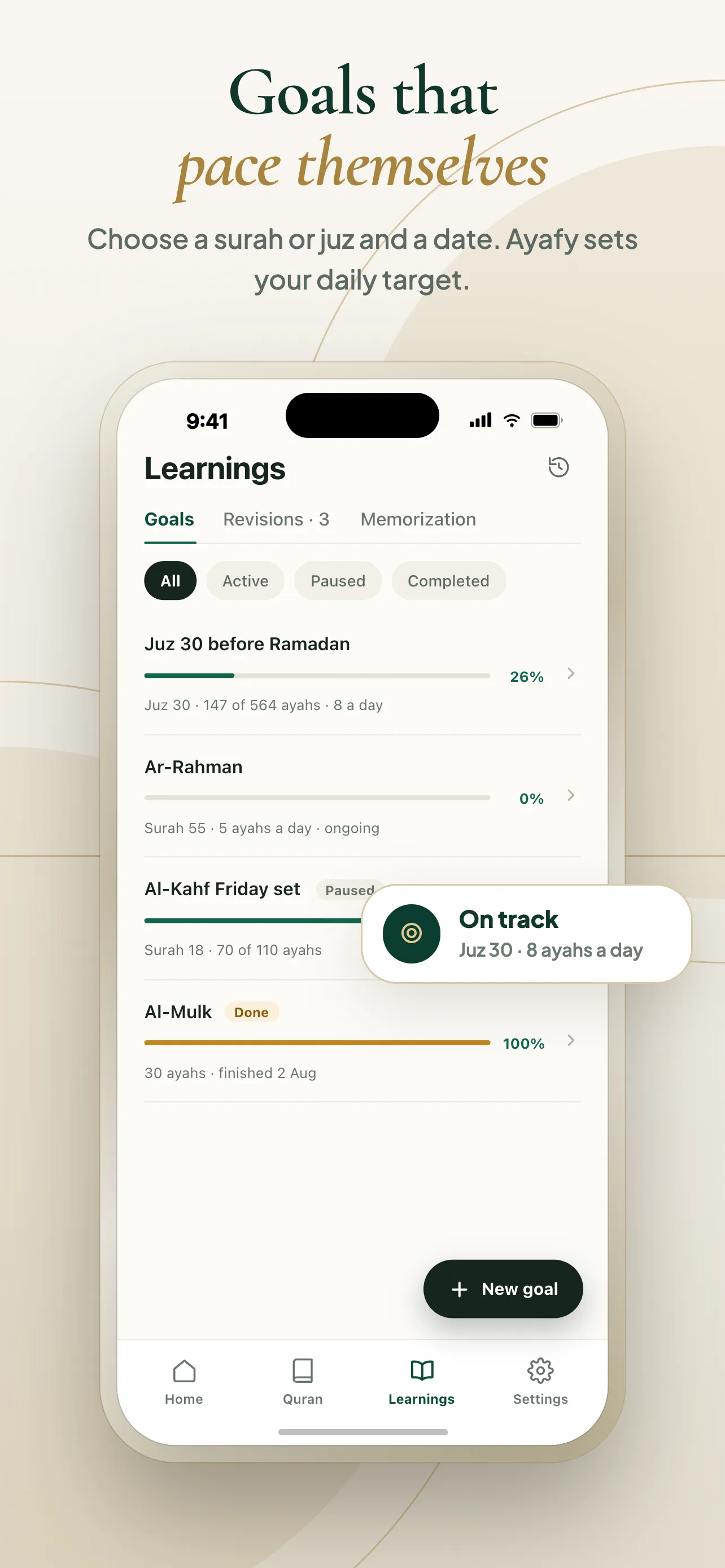
Tap New goal and pick one of three types:
- Surah goal: for example, Surah Al-Mulk.
- Juz goal: for example, Juz 30 (Juz Amma).
- Daily target: a fixed number of ayahs every day, with no end date.
For a surah or juz goal you can add a finish date, and Ayafy works out how many ayahs a day that means. Juz Amma by Ramadan might come to eight ayahs a day. If that looks like too much, push the date back. A goal you can keep is better than an ambitious one you drop in week two.
Step 3: Learn today’s ayahs
Open today’s portion from the home screen. Read it with the translation if that helps you, and listen to it. The recitation audio can loop an ayah and slow it down to 0.75x, which helps with longer ayahs.
Most people find it easiest to learn one ayah at a time. Listen, read, then try it with your eyes closed. When you have it, add the next ayah and recite both together.
Step 4: Recite it from memory
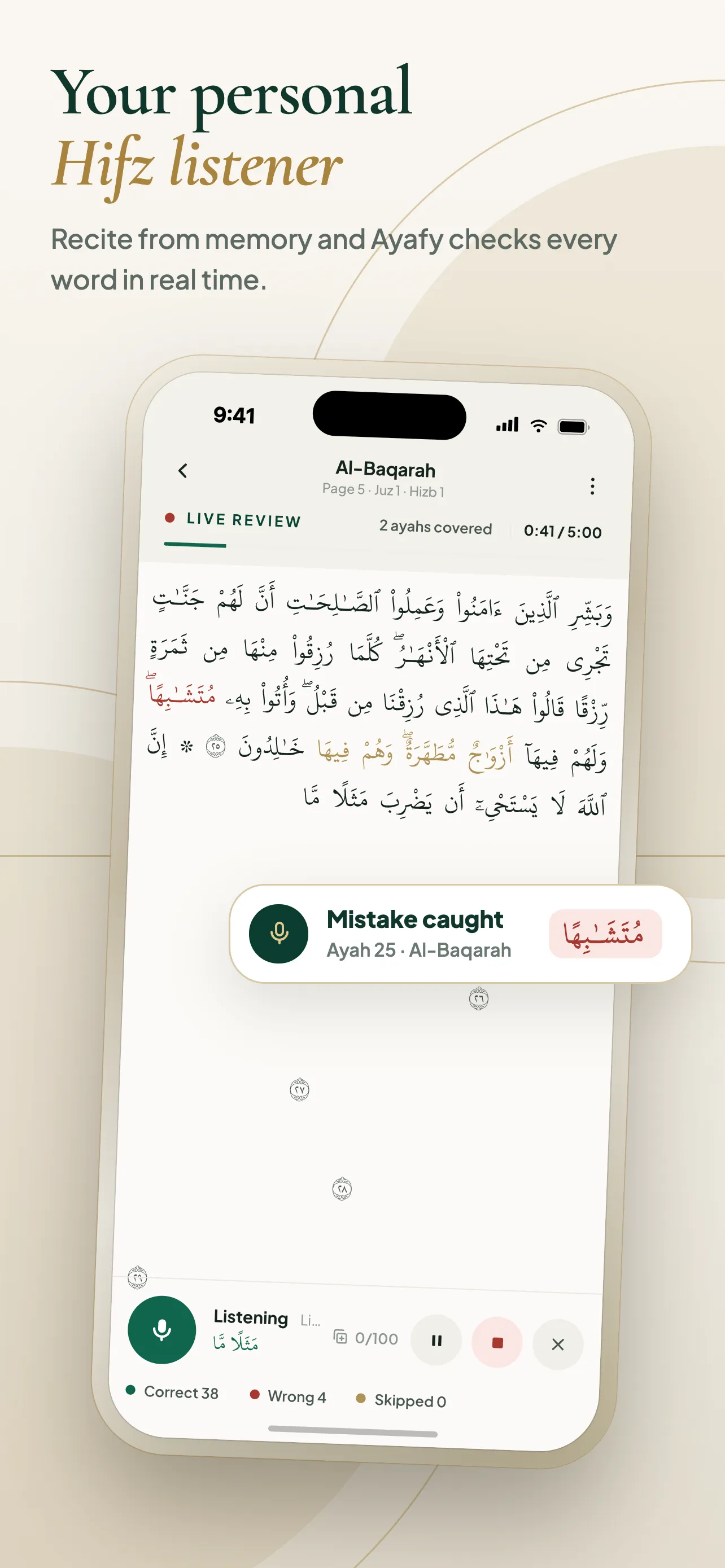
This is the part Ayafy is built for. Open the page and tap Start Review. The words disappear. Now recite from memory at a normal, clear pace.
As you recite, each word appears on the page. Green means correct. Red means wrong. Words you skipped are marked too. You can see the counts at the top as you go, so you know straight away if a passage is not ready.
A couple of tips. Recite somewhere fairly quiet, and keep your hand away from the microphone. Do not rush. A steady tarteel pace works best.
Step 5: Read the summary
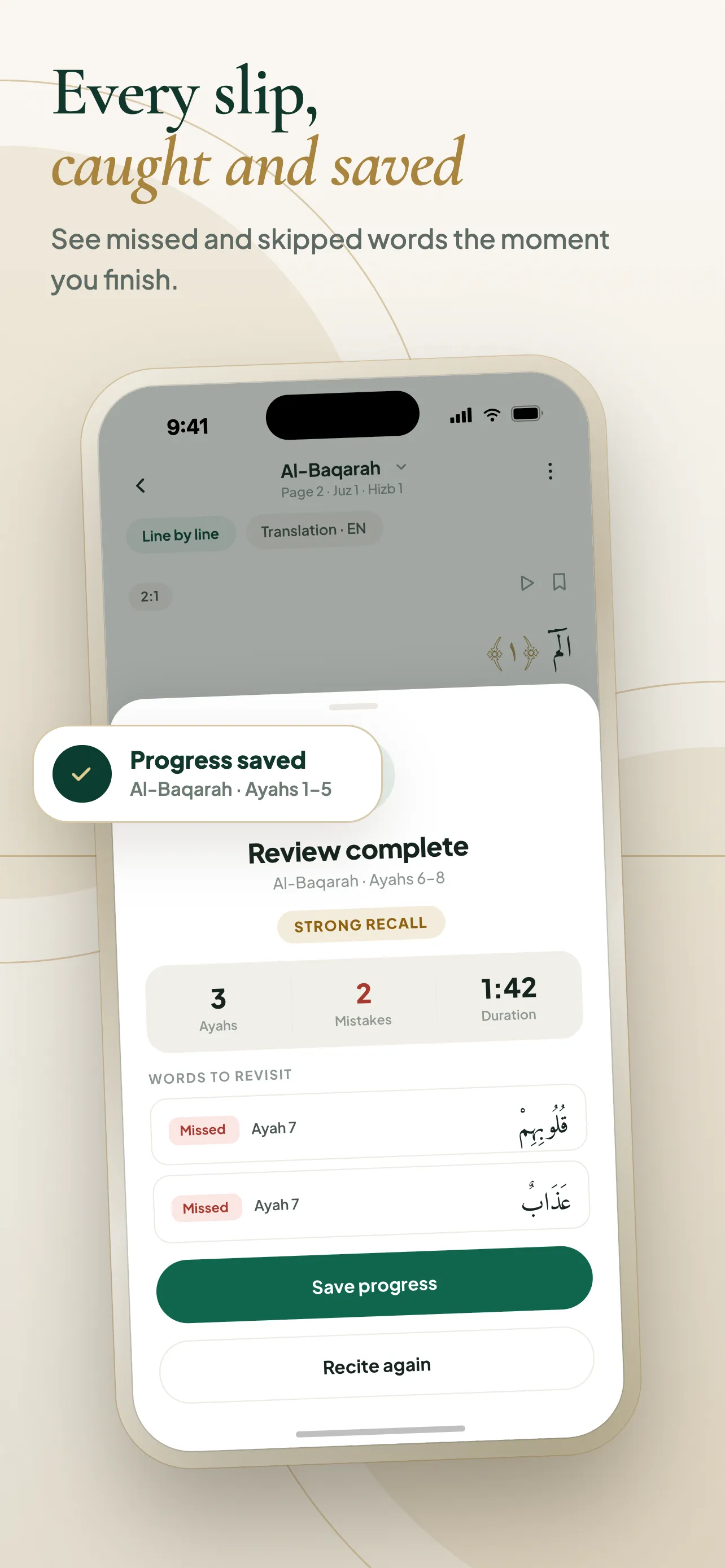
When you stop, Ayafy shows a summary: how many ayahs you covered, how many mistakes, how long it took and a recall rating. Below that is the list of words to revisit, each with its ayah number.
That list is your homework. Go back to those exact ayahs, fix them, and recite the passage again. When the list comes back empty, the lesson is done. Save the session and your tracker updates.
Step 6: Do your revision tests
Learning the new lesson is only half the job. Open Learnings and go to the Revisions tab. Ayafy creates revisions for you as you memorize, so there will usually be one waiting.
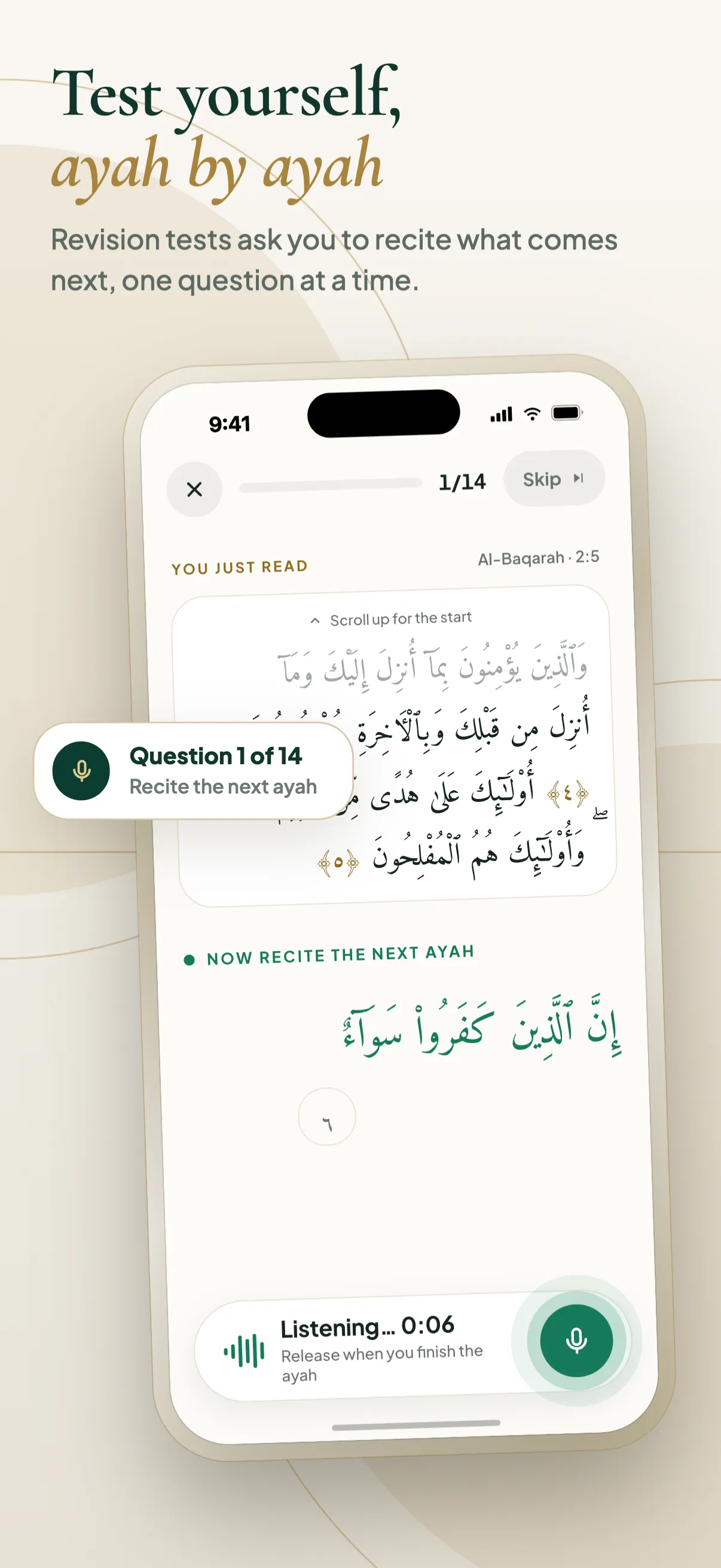
A revision test is a set of short questions. Each one shows you an ayah, and you hold the record button and recite the ayah that comes next. Some questions hide an ayah from the middle instead, and you recite the missing one. Release the button when you finish. If one goes badly, retry it or skip it and move on.
You can also make your own. Choose a surah, a juz or a range of pages, pick how many questions you want, and Ayafy builds the test. This is handy before taraweeh or before you recite to your teacher.
Step 7: Check what is due
Once a week or so, open the memorization tracker. Every surah and page is marked by how long it has been since you revised it: recent, due, aging or overdue. Anything aging or overdue is where your next revision should go, even if you would rather recite something you know well.
You can switch the view between surah, juz and page, whichever matches how your teacher divides your lessons.
Step 8: Set a reminder
Pick a time you will actually keep, such as straight after Fajr, and add a daily reminder from the home screen. Your streak and weekly activity chart on the home screen show at a glance whether the habit is holding.
A simple first week
- Day 1: add what you already know, set one goal, set a reminder.
- Days 2 to 7: learn today’s ayahs, recite them to Ayafy until the words-to-revisit list is empty, then do one revision test.
- End of the week: open the tracker and see what is due.
That is the whole routine. If you want the reasons behind it, read how to revise your hifz so you don’t forget it. If you are still choosing an app, our comparison of Quran hifz apps gives a fair look at seven of them, Ayafy included.
Frequently asked questions
Is Ayafy free?
Yes. Every feature in Ayafy is free, including AI recitation review, revision tests, goals and the memorization tracker. There is no paid tier.
Do I need an account to use Ayafy?
Yes. You sign in with Google or Apple so Ayafy can save your goals, memorization progress and review history and sync them across your devices.
Can I add surahs I memorized before I started using Ayafy?
Yes. In the memorization tracker you can mark surahs and pages as learned in a couple of taps, so they show up in your revision from day one.
Does Ayafy check my tajweed?
No. Ayafy checks whether each word you recite is correct, wrong or skipped. Detailed tajweed correction should come from a qualified teacher.
Does the AI review need internet?
Yes. Your recitation is checked on Ayafy’s servers, so reviews and revision tests need a connection. Reading the Mushaf and downloaded audio work offline.
Free on iOS and Android
Put this into practice with Ayafy
Ayafy listens while you recite from memory, marks every mistake and plans your hifz revision. It is free.